
Physical Therapy Scheduling Software
Online patient self-booking, multi-provider calendars, automated reminders, and waitlist management, designed from the ground up for cash-pay and hybrid PT practices. Not adapted from a hospital system.
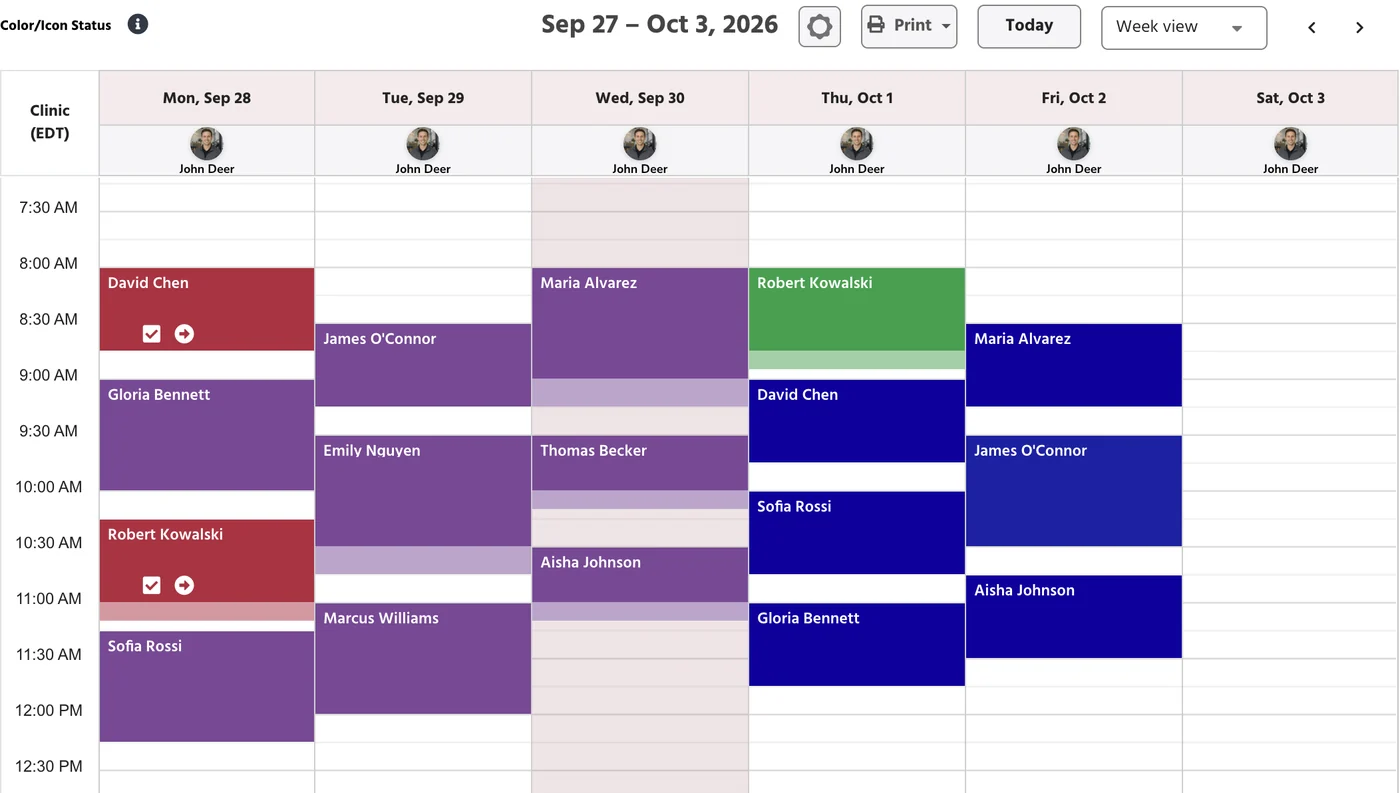
Physical Therapy Scheduling Software Built for Cash-Pay Clinics
Every scheduling feature PT clinics actually use in one system: self-booking, reminders, waitlist, Google sync, and room management.
Self-Service Online Booking
Share your booking link, or put a button on your site that opens it. Patients pick provider, service type, and time, 24/7. No phone call needed.
Automated Reminders & Confirmations
Multi-step SMS, email, and push reminders at 72 hrs, 24 hrs, and 2 hrs out. Patients confirm or cancel with one tap, no call required.
Smart Calendar Management
Color-coded multi-provider view, drag-and-drop rescheduling, and service-type filters. Every PT, aide, and location managed from one screen.
Wait-list & Late-Cancel Rescue
Cancellations instantly notify the next patient on the waitlist. Slots fill automatically. No staff playing phone tag, no lost revenue.
Package Session Booking
Patients book directly against their purchased session package. Remaining sessions tracked automatically, no manual counting.
Two-Way Google Calendar Sync
PtEverywhere appointments sync to Google Calendar in both directions. Block time off from either side. Essential for solo and mobile PT practices.
Room & Equipment Scheduling
Assign treatment rooms and shared equipment at booking. Double-booking a table or a piece of kit becomes impossible.
Mobile Calendar Control
Manage your full schedule from your phone. View your day, update availability, and handle rescheduling between sessions, from anywhere.
Ask about your schedule instead of clicking through it.
Paige is the AI assistant built into PtEverywhere. Check availability, find an open slot, or pull your no-show rate in a single question. Ask it to book or move an appointment and it does that too, then shows you the change to approve before anything is saved.
- "Move Bob's appointment tomorrow to 12:30 PM."
- "Find me an open slot for a new patient Thursday."
- "What's our no-show rate this month?"
- "Update which services Dr. Lee offers at the downtown location."
Why a solid scheduling engine matters for PT clinics
The average PT clinic loses 8–12% of appointments to no-shows. Adding online self-scheduling plus automated reminders cuts that by around 29%, and the reminder sequence starts working in the first couple of weeks.
- 72-hour, 24-hour, and 2-hour reminder sequence, all automated
- One-tap confirm or cancel from the reminder link
- Cancellations trigger instant waitlist notification
29%
fewer no-shows with online booking + automated reminders
2 weeks
to cut no-show rate in half after activating reminders
How PtEverywhere delivers smarter scheduling
Your website works around the clock. Your front desk doesn't have to. Put a booking button right on your site and let new patients self-schedule their eval while you focus on treating. Intake forms, cash-pay or insurance selection, and new patient records are created automatically at booking.
- Customizable intake forms collected at time of booking
- Cash-pay or insurance selection before the first visit
- New patient records auto-created in the EMR
How online PT booking works
The booking creates the patient, the intake and the reminders.
Patient books themselves
From your website or your booking link, at whatever hour suits them.
Intake happens at booking
Customizable intake forms, and a cash-pay or insurance choice, before the first appointment.
The record creates itself
A new patient record appears in the EMR automatically, already linked to the appointment.
Reminders take it from there
Automated confirmations and reminders go out, and the wait list fills late cancellations.
Frequently Asked Questions
Common questions about PT scheduling software.
What is physical therapy scheduling software?
Physical therapy scheduling software is a calendar and booking system designed specifically for PT clinics: online patient self-booking, multi-provider calendars, automated appointment reminders, waitlist management, and resource scheduling. Unlike generic scheduling tools, PT scheduling software integrates with your EMR, billing, and patient portal so everything stays in sync without manual data entry.
Can patients self-schedule PT appointments online?
Yes. PtEverywhere provides direct online booking URLs you can share or put behind a button on your website. Patients pick their provider, service type, and time, 24/7, without calling the clinic. New patient records and intake forms are created automatically in the EMR at the time of booking.
How does PtEverywhere reduce PT clinic no-shows?
PtEverywhere sends a multi-step automated reminder sequence (72 hours, 24 hours, and 2 hours before each appointment) via SMS, email, or push notification. Patients can confirm, cancel, or request to reschedule directly from the reminder link. Cancellations automatically trigger a waitlist notification so the slot gets filled. Clinics using this sequence cut no-shows by around 29%.
Does PtEverywhere scheduling sync with Google Calendar?
Yes. PtEverywhere offers two-way Google Calendar sync so therapists can see their PT schedule alongside personal calendar events, and block time off from either side. This is especially useful for solo and mobile PT practices where the therapist is managing their own schedule.
Can I schedule rooms and equipment in PtEverywhere?
Yes. PtEverywhere includes resource scheduling for treatment rooms, gym equipment, and other shared clinic assets. Resources are assigned when an appointment is booked, so double-booking a room or a piece of equipment is no longer a problem.
See the scheduling system in action
We'll walk through online booking, your calendar view, reminders, and waitlist setup, then configure it for how your clinic works.